 Rating Case ManagerProfessional rating softwareUser login
 How it works · VOA Link
Find the assessment. Build the evidence.
VOA Link brings property search, scheme research, saved work, change monitoring and professional reference into the rating workflow.
Search the relevant rating list
Property finder lets you choose the 2026, 2023 and 2017 lists and switch between Subject search and Scheme search. Search using an address, postcode, UARN or BA property reference, then refine the results.
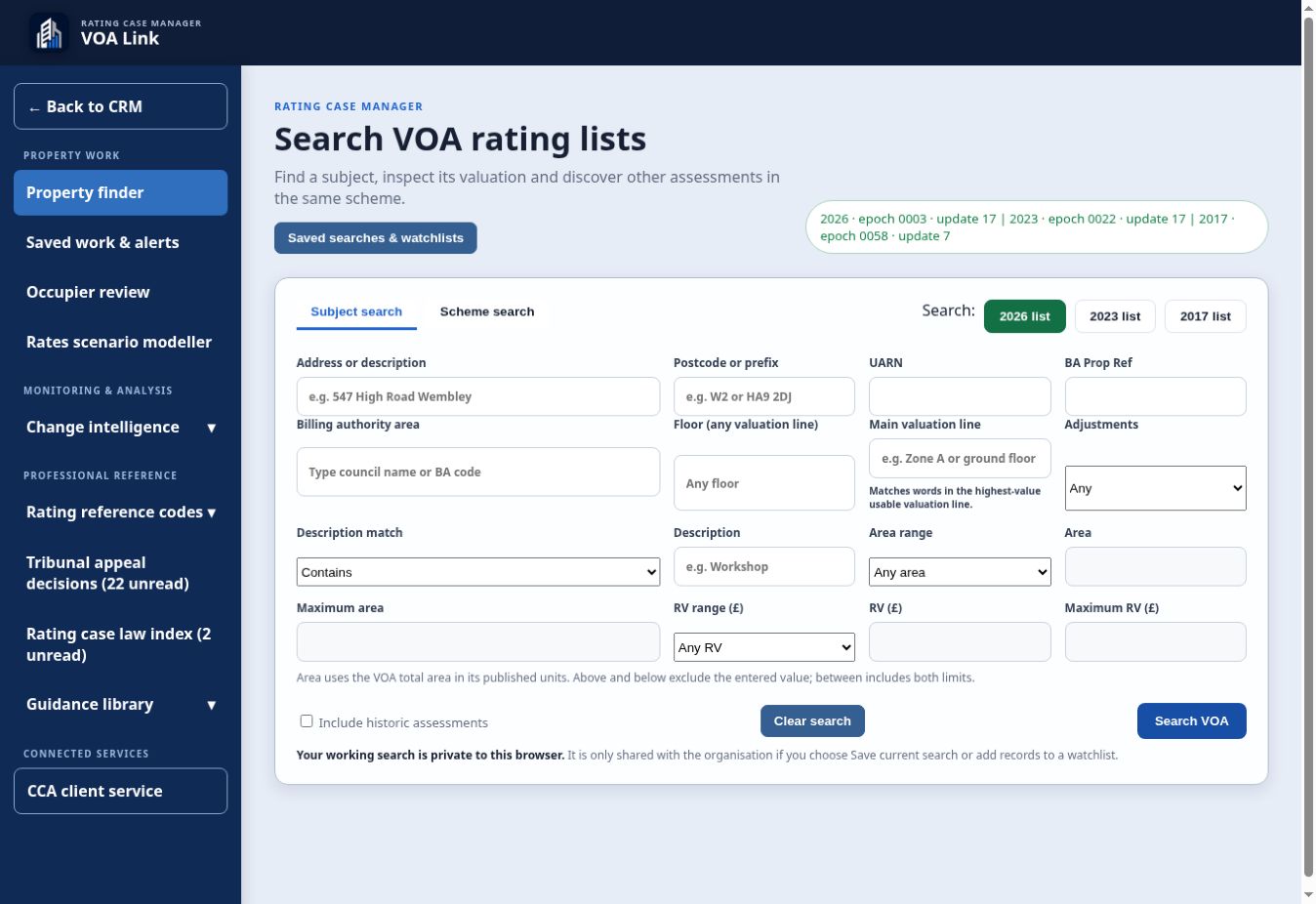
Refine the property search
Use billing authority, floor, main valuation line, adjustments, description, area and RV filters. Include historic assessments when you need assessment history.
- 1
Choose the required lists.
- 2
Enter the subject or scheme criteria.
- 3
Apply the filters needed for the evidence question.
- 4
Select Search VOA and review the returned assessments.
Verify and connect the subject
Review the property identity and relevant list before using the assessment in casework. Opening VOA subject from CRM keeps the search connected to the selected case.
- 1
Open the candidate assessment.
- 2
Check its address, list and property identifiers.
- 3
Review its valuation details and scheme.
- 4
Connect the verified assessment to the appropriate CRM case.
Save work and monitor changes
Use Saved work & alerts for searches and watchlists. Your working search stays private to the browser until you choose to save it or add records to a watchlist.
- 1
Save the search you want to reuse.
- 2
Set watchlist criteria for the properties, schemes or postcodes you are monitoring.
- 3
Review relevant movements, allowances, new assessments and rate changes.
Model a rates scenario
Rates scenario modeller supports the calculation workflow alongside property research. Review the inputs and assumptions before using a result in a client report.
- 1
Open Rates scenario modeller.
- 2
Enter and review the property and scenario inputs.
- 3
Compare the results and save the required output.
Use professional reference tools
Open Rating reference codes, Tribunal appeal decisions, Rating case law index and Guidance library from the VOA Link menu. CCA client service opens the connected HMRC Business Rates workspace.
- 1
Choose the reference tool for the question.
- 2
Review the original source and its relevance to the case.
- 3
Return to CRM or continue into CCA client service.
See the workflow with your team.
Request a walkthrough focused on the casework you manage.